Crown Me Mardi Gras Font
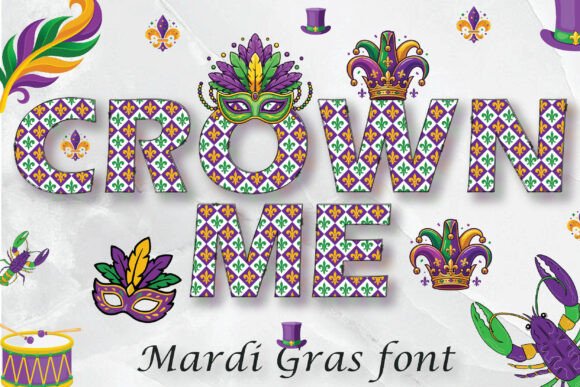
When you're designing for celebration—especially something as vibrant, layered, and culturally rich as Mardi Gras—the right font isn’t just typography. It’s texture, rhythm, and intention. Crown Me Mardi Gras Font delivers that with a pattern-based alphabet where each letter carries its own festive energy: swirling beads, fleur-de-lis motifs, glittering crowns, and rhythmic stripes—all embedded directly into the glyph shapes. Unlike standard fonts that rely on separate background elements or overlays, this one builds visual density into the letters themselves. That means less layering, fewer alignment headaches, and more immediate impact in your layout.
This isn’t a decorative script meant for headlines only. It’s engineered for versatility across real-world creative workflows—from early-stage concepting to final file handoff. Whether you’re drafting an invitation in Canva, prepping a t-shirt mockup in Illustrator, or building classroom posters in Figma, Crown Me Mardi Gras Font integrates without requiring workarounds. Its strength lies in how it supports decisions *before* design even begins: choosing it early sets a consistent tone, reduces revision cycles, and helps stakeholders visualize the final output faster.
Where It Fits in Your Creative Process
Think of Crown Me Mardi Gras Font as a strategic asset—not just a stylistic choice. In project planning, selecting it during the brief phase signals clarity about audience, context, and emotional intent. For educators preparing Fat Tuesday lesson plans, it becomes part of a cohesive visual system alongside printable masks and color-coded vocabulary cards. For small business owners launching a limited-time Mardi Gras promotion, it anchors brand consistency across Instagram carousels, email headers, and in-store signage—no need to recreate patterns manually in each asset.
During execution, the font streamlines iteration. Because the patterns are baked into the glyphs, resizing doesn’t require repositioning secondary graphics. Rotating a banner in Photoshop? The beadwork rotates with the text. Adjusting line spacing in a Canva flyer? The decorative elements scale proportionally. That predictability saves time when juggling tight deadlines or managing multiple deliverables across platforms.
Compatibility That Matches Real Software Use
Crown Me Mardi Gras Font works natively in Adobe Illustrator, Photoshop, Canva, Figma, Inkscape, Silhouette Studio, and CorelDRAW—tools used daily by designers, marketers, crafters, and educators. That broad compatibility means you can start in one app and refine in another without losing fidelity. For example: sketch a poster layout in Figma using the font for live text, then export vectors to Illustrator for print-ready adjustments, or bring the same file into Silhouette Studio for vinyl-cutting prep.
Note the exception: it is not compatible with Cricut Design Space. If your workflow includes Cricut, plan accordingly—either use the font in a compatible app first (e.g., create outlined text in Illustrator), then import as SVG, or reserve Crown Me Mardi Gras Font for digital-only outputs like social posts or PDF invitations. This limitation doesn’t reduce utility; it simply clarifies where the font excels and where alternatives may be needed.
Installation Is Simple—But Timing Matters
Installation takes seconds, but doing it at the right moment prevents friction later. On Windows: right-click the OTF file → Install for all users. On Mac: double-click → Install Font. Once installed, the font appears system-wide in any supported application’s font menu—no restarts or cache clears required.
Pro tip: Install it before opening your design file. If you’ve already started a project in Canva or Figma and switch fonts mid-session, some apps won’t auto-update existing text boxes unless you reapply the typeface manually. Installing first avoids that step—and keeps your focus on composition, not troubleshooting.
What You See vs. What You Get
Here’s a practical note worth internalizing: due to operating system limitations, the font preview (in Font Book or Windows Fonts folder) will appear black-and-white. That’s normal—and temporary. As soon as you select Crown Me Mardi Gras Font in Illustrator, Photoshop, Canva, or Figma, the full-color patterns render instantly. No plugins, no extra swatches, no manual recoloring. The colors are embedded in the font’s OpenType data, so they behave like native assets—not raster images or vector overlays.
This behavior matters most in collaborative environments. When sharing files with clients or team members, there’s no risk of missing assets or broken links. The font carries its appearance within itself. Just confirm the recipient has it installed—or embed it in PDF exports where appropriate (e.g., for printed invitations).
Workflow Integration Tips for Different Roles
- For educators: Use the font in Google Slides or PowerPoint to build interactive Mardi Gras vocabulary slides—then export individual letters as PNGs for hands-on spelling games. Its bold outlines and clear shapes hold up well when printed small.
- For small business owners: Pair Crown Me Mardi Gras Font with a clean sans-serif for body text. This contrast creates hierarchy without sacrificing theme—ideal for flyers where readability and festivity must coexist.
- For social media managers: Build reusable Canva templates with the font applied to headline placeholders. Save variations for Stories, feed posts, and Reels—then swap copy while preserving spacing, color balance, and alignment.
- For crafters and makers: In Silhouette Studio, convert text to paths *after* applying the font—this preserves pattern integrity when cutting vinyl or iron-on transfers. Avoid “weld” operations before outlining, as they can distort fine details.
Maintaining Quality Across Uses
Because Crown Me Mardi Gras Font relies on embedded patterns, legibility depends on size and medium. For print, use 24pt or larger for body text; for digital banners, aim for 48pt minimum. Avoid stretching or skewing the font—it’s designed for upright, proportional scaling. If you need condensed versions, adjust letter spacing instead of distorting glyphs.
Long-term use is straightforward: store the OTF file in a shared team assets folder with version notes. Since it’s a static font (not variable), updates are rare—but if a new release drops, replace the old file and re-sync across devices. No need to reformat existing projects unless you want to test new features.
Finally, consider how this font supports your broader goals—not just for one event, but across seasons. The playful confidence it conveys translates beyond Mardi Gras: think birthday parties, school carnivals, local festival branding, or even themed productivity planners. Its specificity gives it authenticity; its flexibility ensures longevity. When you choose Crown Me Mardi Gras Font, you’re not just adding decoration—you’re aligning tools, timing, and intention in a single, functional decision.